Mobile editing succeeds when the phone is treated as a small production system: enough storage, protected originals, a simple story plan, readable text, clear audio and a tested export. The limitation is not the screen size alone. It is the number of irreversible decisions made without a backup or review.
Prepare the device and project
Before filming or importing, check free storage, battery, available transfer method and backup destination. Create a project folder or album with camera originals, screen recordings, voice, music and graphics. Copy irreplaceable footage before clearing the camera roll.
Write a brief with destination, frame shape, planned duration, caption requirement, music rights and one audience outcome. Mobile editing is fast when the decision is already made; it becomes slow when every clip asks a new strategic question.
Import deliberately
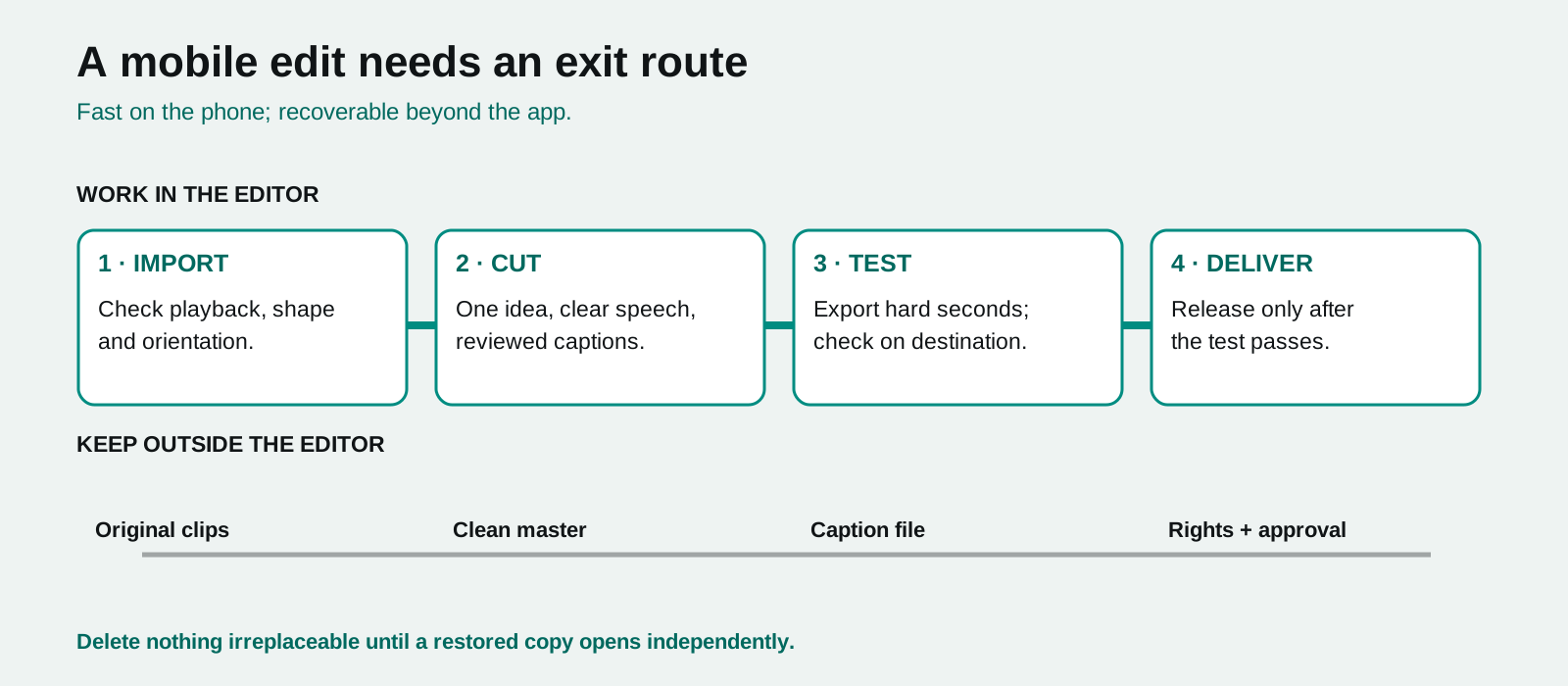
Open a new project and import only the footage needed for the first version. CapCut's current mobile guidance uses this same basic flow: start a project, select media, assemble a timeline, refine and export. Whatever the app, verify that clips play correctly after import and that screen recordings, photos and vertical footage have the expected orientation.
Keep camera originals separate from trimmed copies. If storage requires cleanup, confirm the backed-up originals open on another device or location first.
Build a simple timeline structure
Use five roles:
- opening problem or result;
- minimum context;
- demonstration or proof;
- usable conclusion;
- relevant next step.
Place those elements before adjusting filters, templates or transitions. A short timeline makes it tempting to cut everything tightly, but viewers still need time to inspect a screen, object or change. Remove repetition, not comprehension.
Edit sound before visual polish
Trim distracting starts and endings, balance speech, then add original production sound and music. Listen through the phone speaker and headphones. If the spoken instruction is difficult to understand, solve the recording or mix before adding more effects.
Separate music rights from sound design. A track visible in an app or social platform may be allowed only in a particular account context. Keep a clean master without platform-specific music so the edit can travel lawfully.
Create captions that survive the screen
Auto captions can save time, but they require a word-by-word review. Correct names, numbers and technical terms. Confirm that text stays away from platform interface overlays and remains readable over bright or busy footage.
W3C accessibility guidance notes that captions convey speech and meaningful non-speech audio for prerecorded synchronized media. Do not use decorative animated text as a substitute when it omits the instruction or sound cue that makes the video understandable.
Use effects with a decision rule
Add an effect only when it does one of three things: clarifies a change, makes a necessary edit less disruptive or reinforces a deliberate tone. If it does none of these, it adds cognitive load and can make later re-editing difficult.
Preview effects at normal playback speed and on the target device. A transition that feels smooth in the editor can obscure a comparison or make captions unreadable after compression.
Export a test before the full file
Choose the destination's current aspect ratio, resolution and frame rate; retain source cadence where sensible. Do not maximize every setting automatically. Higher output settings increase file size and render time and cannot recreate lost source detail.
Export a representative short section containing movement, captions, fine detail, a gradient and the loudest speech/music moment. Upload it privately or inspect it on the destination device. Then check:
- crop and safe areas;
- caption size and timing;
- video compression or banding;
- audio sync and speech clarity;
- first and last frame;
- file name and final location.
Export the full delivery only after the test is acceptable.
Archive outside the editor
Keep originals, clean master, delivery export, captions/transcript, music evidence, project notes and approval record in storage you control. Many mobile editors have cloud or account-linked features, but a project should not become unrecoverable because a device, login or app version changes.
Mobile editing is a practical advantage when its workflow stays disciplined: secure the footage, cut for one idea, verify automatic tools, test the export and retain a portable record.
Comparison Matrix